AI Roleplay
Orum

Overview
I led design for Orum's AI Roleplay feature — a 0→1 product built on a lean three-person team. The feature gives sales reps realistic, on-demand practice conversations so they can build confidence, refine their approach, and get consistent feedback without waiting on a manager's calendar.
My biggest design challenge wasn't the interface. It was making AI interactions feel trustworthy and human to users who'd never practiced with a bot before — some found the idea unsettling at first — while still delivering a meaningful, scalable training experience.
AI design focus: Prompt architecture, AI-generated content visual language, model constraint tradeoffs, trust and adoption patterns for AI-skeptical users.
Team
We were a dedicated experimental team focused on fast-paced exploration, prototyping, and validation of new product concepts, with the goal of pinpointing market fit, de-risking big bets, and uncovering high-impact opportunities for future business growth. The team operated leanly: one product manager, one full-stack engineer, and one designer. That structure let us move fast and iterate with minimal overhead.
I owned end-to-end design: research synthesis, information architecture, interaction design, content strategy, and the visual language system for AI-generated content. I also contributed to scenario prompt architecture alongside the PM and engineering lead, helping define how inputs like call type, objection difficulty, and rep goals shaped what the AI produced.
Documentation
Timeline
Role
Goal
2 months (Design completion)
Design lead
-
Ship V1 of a brand new feature called AI Roleplays
-
Test, validate and iterate on scenarios
Research + Discovery
User pain points and needs
To understand the problem space, our team visited several customer on-sites in NYC — observing workflows and speaking directly with reps and managers in their environment.
Managers were relying on Excel sheets to track training and onboarding materials: a lot of manual admin work that provided little visibility into how reps were actually performing or engaging with content.
On AI specifically: Users were generally open to the idea of AI Roleplay, but had real concerns about the experience not feeling human enough. Some found the AI avatar a bit unsettling at first.
Reps told us they often felt unprepared and pressured going into calls. Many wanted more structured practice to refine their voice and methods, especially those working toward AE promotions.
Without a better option, some watched recordings of peer AEs and manually took notes: a workaround that highlighted just how little structured, interactive learning existed.
Managers/team leads
Reps
Based on these insights, we hypothesized that AI Roleplay could offer the kind of realistic, on-demand practice that traditional training couldn't match: faster ramp times, more consistent coaching, and a shift from passive learning to active skill development. The challenge was designing an experience that felt approachable enough for skeptical users while still delivering meaningful practice aligned with real-world needs.
Strategic rationale and business impact
Competitive analysis:
None of our competitors were exploring AI Roleplay within the context of an AI dialing tool, and the broader AI Roleplay space was still relatively niche — which made this a real differentiation opportunity.
For Orum:
Orum had also recently made a significant investment in a broader AI Coaching Suite, positioning the product to deliver a more comprehensive, end-to-end training experience.
Adding AI Roleplay felt like a natural next step: it deepened the product's value and gave the Coaching Suite a practice layer that made the whole suite more compelling.
Exploration + iteration
Understanding user workflows and industry best practices
Before designing anything, the team needed to ground ourselves in real sales funnel processes, trends, and best practices — so the scenarios we built would reflect realistic, high-impact situations for SDRs rather than generic practice content.

Copy considerations
I owned the content strategy for this feature, and copy decisions were as consequential as any interaction decision. We made a deliberate choice to avoid technical terms like "bot" — not just for tone, but because the word itself was a trust barrier for skeptical users. Language throughout the experience emphasized guidance and support rather than replacement.
Avoiding the word "bot" was a strategic call, not a style preference. Users who felt the AI was replacing something human were less likely to engage authentically with the practice. The copy needed to reframe the experience before the UI even loaded.
Clarity, reassurance, and tone were especially important given that some users were unfamiliar with AI tools — or actively skeptical of them.
Prompt architecture for AI-generated scenarios
I worked with the PM and engineering lead to design the prompt structure that powered scenario generation. Rather than leaving this to chance, we defined a repeatable framework:
-
Identify common call types based on sales funnel stages and typical sales processes
-
Assign difficulty using topic complexity, likely objections, and anticipated rep questions
-
Define rep goals aligned with industry standards for handling each scenario type
Each generated scenario included a greeting, title, short summary, specific prompt, rep goals, and avatar assignment.After the initial release, we collected user feedback to understand how scenarios resonated across different teams. Those insights informed iterative improvements — gradually moving from broadly applicable scenarios toward more tailored, team-specific practice.
Design considerations
Page navigation
I explored several approaches to organizing the AI Roleplay landing page so reps could quickly find relevant scenarios. This included grouping by scenario type, role, and difficulty level. User feedback helped determine which structure made the page feel clearest and most intuitive.

Recommended scenarios based on call history and role
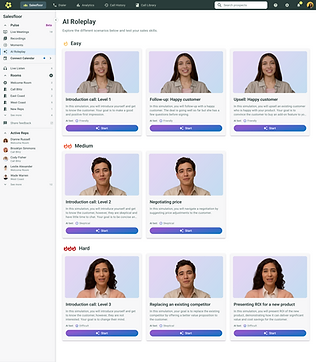
Organized by scenario difficulty

Flatter structure with more specific detail surfaced within cards
Scenario cards
Designing the scenario cards was one of the harder interaction problems on this project. The real tension was between discoverability and visual noise — too little information and reps couldn't tell scenarios apart; too much and they'd stop reading the cards entirely.

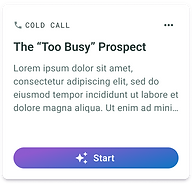


My priorities were to make the page feel lively and inviting while surfacing what reps cared about most: scenario type, difficulty, AI avatar personality, and goals. I ran rapid exploration cycles testing thumbnail treatments, responsive layouts, text length, badges and chips for quick scanning, and hover states for additional context.
Each iteration helped clarify what was essential versus distracting. The final cards were designed to be visually appealing, quickly scannable, and accessible — with legible text, sufficient contrast, and intuitive interactions across devices.


A more guided experience — and why we moved away from it
I explored a version of the roleplay experience that included a criteria checklist visible on-screen as reps moved through a scenario — essentially scaffolding the conversation in real time.
We ultimately decided against it. The best salespeople don't rely on scripts — they depend on intuition, adaptability, and their own communication style. An on-screen criteria panel risked training a crutch rather than a skill, and would likely become a distraction rather than a help once the conversation got going. The lighter, more streamlined experience better supported natural conversation flow.
Any guidance needed to be introduced thoughtfully — not plastered across the screen mid-call.

Navigate scenarios in a side panel

Criteria checklist in panel

Scenarios broken into chapters so users can retry and skip to relevant sections
Visual language for AI-generated content
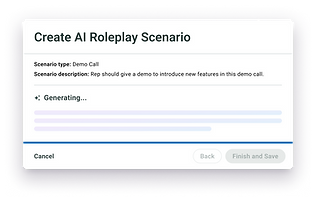
One of the more nuanced design problems was figuring out how to visually distinguish AI-generated content from fields that needed manual input. Without clear cues, users weren't sure what to trust, review, or act on.
I explored several approaches: an AI gradient color treatment for auto-filled fields, a star icon as a visual cue within text field labels, and label copy adjustments to explicitly surface when content was AI-generated. Defining these consistent visual cues helped users immediately understand what the AI produced versus what they needed to review or customize — a pattern that became a reusable part of the broader design system.



Customization and scalability
After the initial release, it became clear that reps needed more than standardized scenarios — they wanted to tailor practice to the factors that actually shape their calls: team size, business quarter, market conditions, shifting economic context. The design challenge was balancing flexibility with ease of use. Reps needed to drill down into relevant details without being burdened by a complex setup or too much upfront input. Too many fields and they'd abandon the flow; too few and the output wouldn't feel relevant to their situation.
High level flow:
The user provides a basic prompt describing the business context or scenario they need.
The tool uses Orum's company and user profile data to fill in missing details and generate a tailored output.
The user reviews the generated scenario.
The user confirms and finalizes it.
I explored several UI approaches for the creation flow, each representing a different point on the effort-vs-control spectrum.

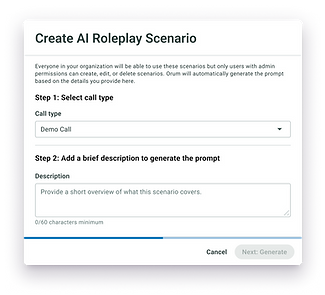
Option A (Minimal effort): Users provide a basic prompt and Orum handles the rest — assigning avatars, generating summaries, filling gaps. Lower friction, faster to complete.

Option B (Full control): Users can customize down to avatar selection and avatar personality. More investment upfront, but the output feels more specifically theirs.
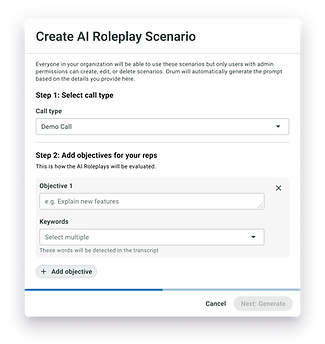
Option C (Admin-level): Admins and managers can set custom metrics and criteria that shape how reps' scenarios are evaluated — useful for teams with specific coaching frameworks or performance goals.
The entry point had to work for all three — so rather than defaulting to the most complex version, I designed a single upfront choice: generate automatically or enter manually. That one decision routed users to the right level of involvement before they ever saw a form field.
Constraints with AI tooling
As we rolled out V1, we continuously adapted to evolving user needs and the real constraints of our AI provider — navigating model limitations while also optimizing for cost and performance. Some features we'd initially designed had to be scoped back or redesigned entirely based on what the model could reliably do within budget.This was a meaningful part of the project: designing within constraint rather than ideal conditions, and making explicit tradeoffs between capability, cost, and user experience.

Analytics for managers: A post-launch insight
After launch, a pattern emerged in manager feedback: they could see reps were doing roleplays, but had no visibility into how. They couldn't tell which scenarios were being used, which reps were practicing consistently, or whether the tool was actually driving skill improvement.I scoped and designed an analytics layer that surfaced scenario usage by team and by rep. It was a relatively contained addition, but it reframed what AI Roleplay was — not just a practice tool for individual reps, but a coaching asset managers could actively use. That shift was important for adoption at the team level, not just individual usage.


Quality and feedback loop
We implemented a feedback dialog using Appcues to capture user insights directly within the product — in context, not after the fact.Collecting feedback this way gave us more actionable, real-time data than post-session surveys would have. It let us iterate faster, prioritize improvements based on actual user needs, and keep the product aligned with how SDRs were working day to day
Unifying the platform: Moving AI Roleplay into the Coaching Suite
We implemented a feedback dialog using Appcues to capture user insights directly within the product — in context, not after the fact.Collecting feedback this way gave us more actionable, real-time data than post-session surveys would have. It let us iterate faster, prioritize improvements based on actual user needs, and keep the product aligned with how SDRs were working day to day

Final design

Home


Analytics: Overview
Analytics: History
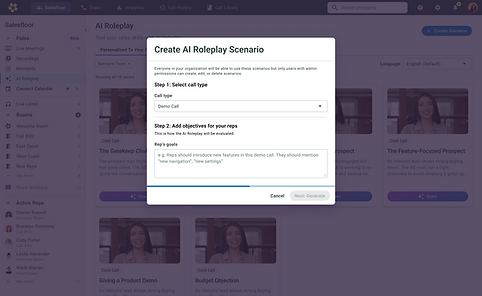

Create custom AI Roleplay: Add info
Create custom AI Roleplay: Generating state
Impact
-
Picked up by 150+ customer orgs
-
Power users averaging 100+ minutes of practice, with steady month-over-month usage across core teams
-
Became a real piece of Orum's AI Coaching story — a coaching pitch tied to actual time spent practicing, not just a feature being turned on
-
Teams using Orum's AI-powered stack saw 55–62% increases in connects and meetings booked across large BDR organizations. One customer doubled their meetings booked with fewer reps.


Reflection
This project pushed me in a few directions I hadn't fully anticipated.
-
Designing for AI isn't just about the interface. I's about understanding what the model can reliably do, what it can't, and how to set user expectations honestly without undermining their confidence in the tool. Navigating those tradeoffs in real time, with real cost constraints, was one of the more genuinely novel parts of the work.
-
The research insight that stuck with me most was how much the framing mattered before users ever touched the product. Users who came in skeptical of AI didn't need a better feature; they needed a different story about what they were doing. Getting that right in the copy and the onboarding flow was as important as anything in the interaction design.